Internationalization (i18n)
NuxtPro uses @nuxtjs/i18n, which is deeply compatible with Nuxt, to provide internationalization support. With a small amount of configuration you can get started quickly.
i18n configuration
Configure the i18n section in nuxt.config.ts. This controls the default locale and the supported locales:
ts
// Enable i18n module
modules: [
  '@nuxtjs/i18n',
],
i18n: {
  strategy: 'prefix_except_default', // routing strategy
  locales: ['en-US', 'zh-CN', 'JP'], // supported locales
  defaultLocale: 'en-US', // default locale
  vueI18n: '@@/i18n/config.ts', // vue-i18n config entry
}
i18n folder
All i18n-related configuration lives in the i18n folder in the project root:
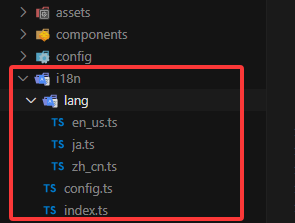
index.ts controls locale mapping:
ts
// framework i18n files
import zh_cn from './lang/zh_cn';
import en_us from './lang/en_us';
import ja from './lang/ja';

// load i18n messages from lang folder
export const loadLang = (modules: Record<string, any>) => {
	let messages: { [key: string]: string } = {};

	Object.keys(modules).forEach(module => {
		Object.assign(messages, { ...modules[module].default });
	})

  return messages;
}

export const messages: { [key: string]: any } = {
  'zh-CN': {
    langName: '简体中文',
    ...loadLang(zh_cn),
  },
  'en-US': {
    langName: 'English',
    ...loadLang(en_us),
  },
  'JP': {
    langName: '日本語',
    ...loadLang(ja),
  }
}
config.ts controls the Vue I18n config:
ts
import zh_cn from './lang/zh_cn';
import en_us from './lang/en_us';
import ja from './lang/ja';

export default defineI18nConfig(() => ({
  legacy: false,
  missingWarn: false,
  fallbackWarn: false,
  fallbackLocale: 'en-US',
  messages: {
    'zh-CN': zh_cn,
    'en-US': en_us,
    'JP': ja
  }
}))
The lang folder contains your translations for each language. Example snippets:
中文
home: {
        title: 'NuxtPro',
        description: '基于Nuxt3的企业级SaaS出海模板,预集成Stripe/Cream支付、谷歌登录、多语言路由和SEO工具。快速构建SSR的全球化Web应用,开箱即用',
        startLink: '立即开始免费体验~',
        thirdPartyLink: '前往Github~',
        loginButton: '登录',
        discountGet: '??推特(X)关注立即获取40刀折扣券??',
        features: {
            title: '集成当下最流行的开源技术栈方案,让您的创业历程仅需片刻',
            sutTitle_1: 'NuxtJs3',
            subDescription_1: '开源的全栈的适用于生产环境的 NuxtJs 框架。',
            sutTitle_2: 'Vue 3',
            subDescription_2: '用于 Web 和原生用户界面的开源代码库。',
            sutTitle_3: 'BetterAuth',
            subDescription_3: '开源的认证授权框架。',
            sutTitle_4: 'Shadcn UI',
            subDescription_4: '用于构建现代风格界面的开源UI组件。',
            sutTitle_5: 'Tailwindcss',
            subDescription_5: '用于快速 UI 开发的开源 CSS 框架。',
            sutTitle_6: 'DrizzleOrm',
            subDescription_6: '用于 Node.js 和 TypeScript 的开源下一代数据库工具包',
            sutTitle_7: 'Stripe',
            subDescription_7: '最好、最安全的在线支付服务。',
            sutTitle_8: 'Creem',
            subDescription_8: '为 SaaS 和独立开发者提供稳定的的在线支付服务,且不会让他们破产。',
            sutTitle_9: 'Resend',
            subDescription_9: '为开发者们打造的现代邮件API服务。',
            sutTitle_10: 'i18n',
            subDescription_10: '开源且轻松地为Nuxt项目添加国际化支持。',
            sutTitle_11: 'plausible',
            subDescription_11: '开源且隐私友好的Google Analytics 替代品。',
            sutTitle_12: 'vite-pwa',
            subDescription_12: '基于vite的开源且零配置的PWA框架。',
        },
                     ...........
英文
home: {
  title: 'NuxtPro',
  description: 'Open-source Nuxt 3 SaaS starter with payments, auth, i18n routing, and SEO helpers.',
  startLink: 'Start Free Trial~',
  thirdPartyLink: 'GitHub →',
  loginButton: 'Login'
}
日本語
home: {
  title: 'NuxtPro',
  description: '決済・認証・i18n ルーティング・SEO を備えた Nuxt 3 SaaS スターター。',
  startLink: '無料トライアルを開始',
  thirdPartyLink: 'GitHub →',
  loginButton: 'ログイン'
}
How to use in the project
NuxtPro is already wired up—no extra imports are needed. In templates, use:
html
{{ $t('your.translation.key') }}Example:
html
<div class="prose prose-lg max-w-none text-gray-300 prose-headings:text-white prose-strong:text-white prose-a:text-yellow-400 hover:prose-a:text-yellow-300">
  <h2 class="mt-8 border-b pb-2 border-gray-700 text-yellow-400">{{ $t('terms.introduction.heading') }}</h2>
  <p>{{ $t('terms.introduction.p1') }}</p>

  <h2 class="mt-12 border-b pb-2 border-gray-700 text-yellow-400">{{ $t('terms.useOfServices.heading') }}</h2>
  <p>{{ $t('terms.useOfServices.p1') }}</p>

  <h2 class="mt-12 border-b pb-2 border-gray-700 text-yellow-400">{{ $t('terms.userAccounts.heading') }}</h2>
  <p>{{ $t('terms.userAccounts.p1') }}</p>

  <h2 class="mt-12 border-b pb-2 border-gray-700 text-yellow-400">{{ $t('terms.intellectualProperty.heading') }}</h2>
  <p>{{ $t('terms.intellectualProperty.p1') }}</p>

  <h2 class="mt-12 border-b pb-2 border-gray-700 text-yellow-400">{{ $t('terms.userContent.heading') }}</h2>
  <p>{{ $t('terms.userContent.p1') }}</p>

  <h2 class="mt-12 border-b pb-2 border-gray-700 text-yellow-400">{{ $t('terms.prohibitedActivities.heading') }}</h2>
  <p>{{ $t('terms.prohibitedActivities.intro') }}</p>
  <ul class="list-disc pl-6">
    <li>{{ $t('terms.prohibitedActivities.item1') }}</li>
    <li>{{ $t('terms.prohibitedActivities.item2') }}</li>
    <li>{{ $t('terms.prohibitedActivities.item3') }}</li>
    <li>{{ $t('terms.prohibitedActivities.item4') }}</li>
  </ul>
</div>
If you want to translate strings in scripts (ts), use:
ts
t('your.translation.key')Example:
ts
// Map payment status to a translated label
const getStatusText = (payType: string) => {
  const statusMap: Record<string, string> = {
    '0': t('affiliate.referral_record_status_created'),
    '1': t('affiliate.referral_record_status_pending'),
    '2': t('affiliate.referral_record_status_completed'),
    '3': t('affiliate.referral_record_status_canceled')
  };
  return statusMap[payType] || 'Unknown status';
};